



Is It Safe To Use A Third-Party USB-C Charger For Your MacBook?
Using a third-party USB-C charger for a MacBook can be safe, but only when the charger meets proper certification and technical standards. Apple’s power management system is sophisticated, yet it relies on accurate voltage negotiation from the charger. Certified chargers that comply with USB Power Delivery (PD) protocols generally perform well, while uncertified or counterfeit models can cause overheating, reduced battery life, or even damage to internal circuits. The key lies in compatibility, wattage accuracy, and build quality rather than brand alone.
Understanding USB-C Charging Technology for MacBooks
Apple’s shift to USB-C charging introduced flexibility and universal connectivity but also raised questions about safety when mixing brands. To evaluate the safety of third-party chargers, one must first grasp how USB-C PD technology communicates with MacBook hardware.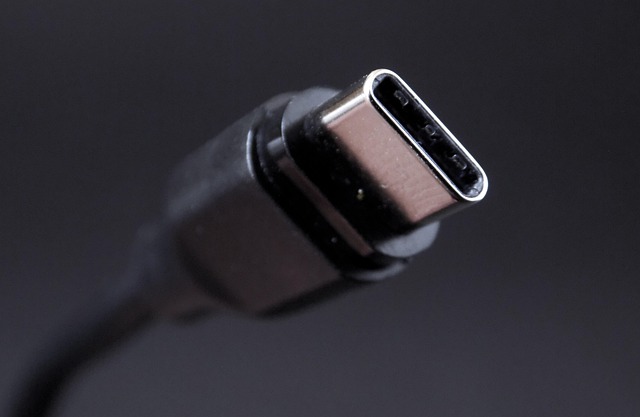
The Fundamentals of USB-C Power Delivery
USB Power Delivery allows dynamic voltage adjustment between 5V and 20V depending on device needs. The MacBook’s internal circuit negotiates these levels through embedded controllers to maintain stable current flow. The System Management Controller (SMC) monitors thermal and electrical conditions, cutting off power if irregularities occur. This layered protection ensures that even minor voltage mismatches don’t escalate into hardware failures.
Apple’s Implementation of USB-C Charging Protocols
Apple modifies standard PD communication by embedding proprietary handshake signals in firmware. These signals verify cable integrity and charger authenticity before initiating full power transfer. When a non-Apple charger connects, macOS may restrict charging speed to prevent excessive current draw. Firmware-level safety checks continuously monitor connector temperature and load balance to avoid stress on the logic board.
Evaluating the Safety of Third-Party USB-C Chargers
The market offers countless third-party chargers claiming MacBook compatibility. However, not all meet strict compliance standards or use components capable of sustaining high-wattage output safely.
Certification and Compliance Considerations
USB-IF certification confirms that a charger follows official PD specifications. Certified units undergo electrical testing for stability under variable loads. Uncertified or counterfeit chargers often skip these steps, risking unstable voltage output that can harm sensitive circuits. Authentic products usually display labeling such as “USB-IF Certified” or include traceable documentation verifying compliance.
Electrical and Thermal Safety Factors
A poorly designed usb c charger may exhibit voltage ripple or inconsistent current delivery. Such fluctuations can cause micro-arcing within the port over time. Heat dissipation also varies widely—OEM chargers typically use aluminum shielding and thermal paste layers to manage temperature rise, while cheaper copies rely on minimal insulation, leading to overheating during prolonged use.
Technical Risks Associated with Non-OEM Chargers
Even when basic charging works, deeper technical risks persist due to protocol mismatches or subpar firmware design in third-party devices.
Power Negotiation Failures and Their Consequences
Incorrect PD negotiation may result in delivering higher voltage than expected. This can stress battery cells or trigger SMC protection shutdowns. In some cases, transient spikes damage MOSFETs on the logic board. Apple mitigates this through redundant sensing circuits that immediately cut off abnormal current flow.
Data Security Concerns in USB-C Connections
Because USB-C handles both data and power, compromised accessories could inject malicious code via embedded microcontrollers. Counterfeit chargers sometimes include unauthorized chips mimicking genuine PD controllers but with hidden firmware functions. Using power-only cables—those without data lines—reduces this risk significantly when charging from unknown sources.
Performance Implications When Using Third-Party Chargers
Beyond safety, performance consistency matters for professionals relying on stable power during intensive workloads like video editing or code compilation.
Charging Efficiency and Battery Longevity
Apple’s original adapters optimize charge curves based on lithium-ion chemistry parameters stored in firmware tables. Generic chargers rarely replicate this precision; they might maintain constant high current even after 80% capacity, accelerating chemical aging inside cells. Efficiency losses of 5–10% are common when measured using inline power meters under identical conditions.
Device Performance During Simultaneous Use and Charging
When running heavy tasks while charging from a lower-wattage adapter—say 45W instead of the recommended 61W—the system may throttle CPU frequencies to maintain energy balance. This throttling prevents sudden shutdowns but affects sustained performance during rendering sessions or virtual machine operation.
Guidelines for Selecting a Reliable Third-Party Charger
Choosing a safe usb c charger involves more than matching plug type; it requires evaluating specifications and physical construction closely.
Key Specifications to Evaluate Before Purchase
Wattage Rating Compatibility
Each MacBook model has defined wattage needs: 30W for Air models up to 96W for Pro variants. Underrated adapters charge slowly or fail under load; overrated ones offer no real benefit unless they adhere strictly to PD limits.
Cable Quality and E-Marker Chips
High-wattage delivery above 60W demands e-marked cables containing identification chips that communicate safe current capacity to both ends of the connection.
Build Quality Indicators
Look for solid casing seams, proper grounding pins, and visible venting slots near transformer modules—signs of thoughtful thermal engineering rather than cost-cutting assembly.
Recommended Practices for Safe Usage
Regular Inspection Routines
Periodically inspect connectors for discoloration or deformation indicating heat buildup; replace damaged cables immediately to avoid port corrosion.
Environmental Considerations
Avoid using chargers in confined spaces without airflow since heat accumulation shortens component lifespan significantly.
Monitoring Charging Behavior
macOS provides energy reports showing real-time wattage input; any irregular drops or spikes suggest incompatibility issues worth investigating early.
The Future of Universal Charging Standards for Laptops
As industry collaboration grows under newer PD revisions like 3.1 supporting up to 240W output, cross-brand interoperability is improving steadily.
Evolution Toward True Interoperability Across Brands
Upcoming standards introduce adaptive voltage scaling allowing laptops from different manufacturers to negotiate optimal power dynamically through smart hubs capable of distributing wattage among multiple connected devices simultaneously.
The Role of Regulatory Bodies in Ensuring Charger Safety
International standards such as IEC 60950 and IEC 62368 define electrical safety requirements covering insulation resistance, leakage currents, and temperature thresholds during continuous operation. The European Union’s forthcoming regulations will further tighten certification rules for universal chargers sold within its market boundaries.
FAQ
Q1: Can using a low-wattage usb c charger harm a MacBook?
A: It won’t cause direct damage but may slow charging dramatically and increase heat due to prolonged current draw cycles.
Q2: How can one verify if a third-party charger is certified?
A: Look for official USB-IF logos or check serial numbers against public compliance databases maintained by industry groups.
Q3: Do cheaper chargers always pose risks?
A: Not necessarily; some affordable models meet standards but lack premium materials affecting durability rather than safety itself.
Q4: Why does macOS sometimes show “Not Charging” even when plugged in?
A: That occurs when input wattage is below system demand; the MacBook prioritizes operation over battery replenishment temporarily.
Q5: Are magnetic adapters safe with USB-C ports?
A: Generally yes if they pass PD negotiation correctly; however poorly designed ones may loosen connections causing intermittent arcing over time.